Introduction
A washing machine that won’t spin is a common and frustrating problem. When your Videocon washing machine refuses to spin, your clothes remain soaking wet after the wash cycle, and you can’t dry them properly. This issue often arises due to a simple problem, but neglecting it can lead to more severe damage and costly repairs. It’s crucial to address this issue promptly to avoid inconvenience and potential damage to your machine.
Common Causes of Videocon Washing Machine Spin Not Working
Here are some of the most frequent reasons your Videocon washing machine might not be spinning:
- Overloading the Machine: Too many clothes can prevent the drum from spinning freely.
- Unbalanced Load: Clothes bunched on one side can trigger a safety mechanism to prevent spinning.
- Lid Switch Malfunction: The lid switch ensures the machine only spins when the lid is closed. If it’s faulty, the machine won’t spin.
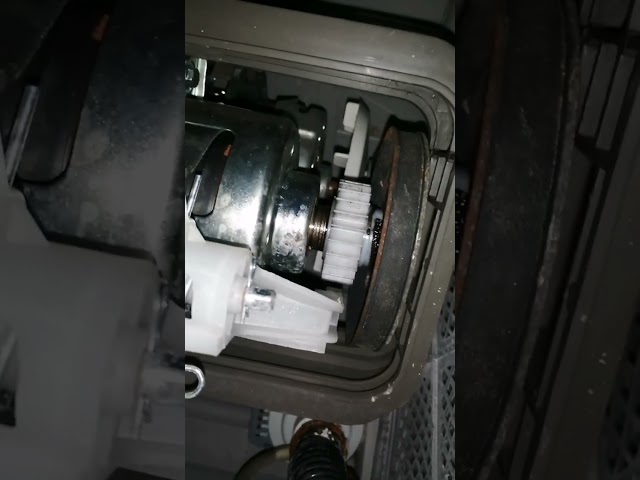
- Faulty Motor Coupler: This part connects the motor to the transmission; if it breaks, the drum won’t spin.
- Worn Drive Belt: The drive belt transfers power from the motor to the drum. Over time, it can wear out or break.
- Drainage Issues: If the washer can’t drain water properly, it won’t spin.
- Clogged Drain Pump Filter: A blocked filter restricts water flow and hinders the spin cycle.
- Motor Problems: While less common, a failing motor can prevent the drum from spinning.
- Control Board Issues: A malfunctioning control board can disrupt the spin cycle.
Symptoms Checklist
Use this checklist to help pinpoint the problem:
- The washing machine fills and washes, but doesn’t spin.
- The washing machine makes unusual noises during the spin cycle (or attempts to spin).
- The washing machine displays an error code related to spinning or draining.
- The drum moves freely by hand when the machine is off, but not during the spin cycle.
- Clothes are soaking wet after the cycle completes.
How to Fix Videocon Washing Machine Spin Not Working Step-by-Step Guide
Follow these steps to troubleshoot and fix your washing machine:
- Unplug the Washing Machine: Always disconnect the power before attempting any repairs.
- Check for an Overloaded Machine: Remove some clothes to see if the machine spins with a smaller load.
- Re-balance the Load: Manually redistribute the clothes evenly inside the drum.
- Inspect the Lid Switch: Locate the lid switch (usually near the lid hinge). Open and close the lid firmly several times. Sometimes a small piece of debris can prevent the switch from engaging.
- Check the Drain Hose: Ensure the drain hose isn’t kinked, clogged, or blocked.
- Clean the Drain Pump Filter: Locate the drain pump filter (usually behind a small access panel at the front or bottom of the machine). Unscrew the cap and clean out any lint, debris, or small objects.
- Check for Error Codes: Consult your washing machine’s manual to identify any error codes displayed on the control panel and follow the recommended troubleshooting steps.
- Inspect the Drive Belt (If Accessible): If you can access the drive belt (typically by removing the back panel), check for wear, cracks, or breakage.
- Manually Test the Drum Rotation: With the machine unplugged, try rotating the drum by hand. It should move freely. If it’s stiff or makes grinding noises, there may be an internal mechanical issue.
- Check the Motor Coupler (If Accessible): This is usually located between the motor and the transmission. Look for signs of damage or breakage.
- Run a Rinse and Spin Cycle: After checking the above, try running a rinse and spin cycle to see if the machine will now spin.
- Look for Obstructions: Make sure no items are caught between the inner and outer drum, which can prevent spinning.
- Check the Water Level: If the machine is sensing there is still water inside, it will not spin. Look for a malfunctioning water level sensor.
Fix the Issue Without Buying Parts
Often, the problem can be resolved without purchasing new components:
- Reset the Machine: Unplug the machine for 5-10 minutes, then plug it back in. This can sometimes reset the control board.
- Proper Loading Techniques: Avoid overloading and ensure balanced loads in the future.
- Regular Cleaning: Clean the drain pump filter regularly to prevent blockages.
- Careful Inspection: Visually inspect all accessible components for signs of damage or wear.
When Replacement Might Be Necessary
If the above steps don’t resolve the issue, replacement of certain parts might be necessary. Common parts that fail include the lid switch, drive belt, motor coupler, drain pump, or motor. Replacement costs can range from $20 to $200+ USD, depending on the part and the model of your Videocon washing machine. Replacing the entire machine should be a last resort.
Safety Warning
- Always unplug the washing machine before attempting any repairs.
- Avoid working on the machine near wet floors to prevent electric shock.
- If you are uncomfortable performing any of these steps, consult a qualified appliance repair technician.
- Be careful when handling tools to avoid injury.
Tools You May Need
- Screwdrivers (Phillips and flathead)
- Pliers
- Wrench set
- Gloves
- Shop Towels
- Flashlight
FAQ
Here are some frequently asked questions:
-
Q: Why is my washing machine making a loud banging noise during the spin cycle?
A: This is usually caused by an unbalanced load. Stop the machine, redistribute the clothes, and try again. -
Q: How do I know if my lid switch is faulty?
A: If the machine won’t spin and the lid switch appears loose or damaged, it’s likely faulty. You can test it with a multimeter (if you have experience with electrical testing) or replace it. -
Q: Can a clogged drain hose cause the washing machine not to spin?
A: Yes, if the machine can’t drain water, it won’t spin. Check the drain hose for kinks or blockages. -
Q: How often should I clean the drain pump filter?
A: It’s recommended to clean the drain pump filter every 1-3 months, or more frequently if you wash heavily soiled items.
Conclusion
Troubleshooting a “videocon washing machine spin not working” issue can seem daunting, but by following these steps, you can often identify and resolve the problem yourself. Start with the simplest solutions, like checking for overloads and clogs, before considering more complex repairs. Remember to prioritize safety by unplugging the machine before working on it. If you’ve tried these steps and your washing machine still refuses to spin, it might be time to call a qualified technician. But hopefully, you’ve saved yourself a service call and are back to clean, spun-dry clothes!
Youtube Video:
Looking for more useful options?
Check out recommended resources that others find helpful.