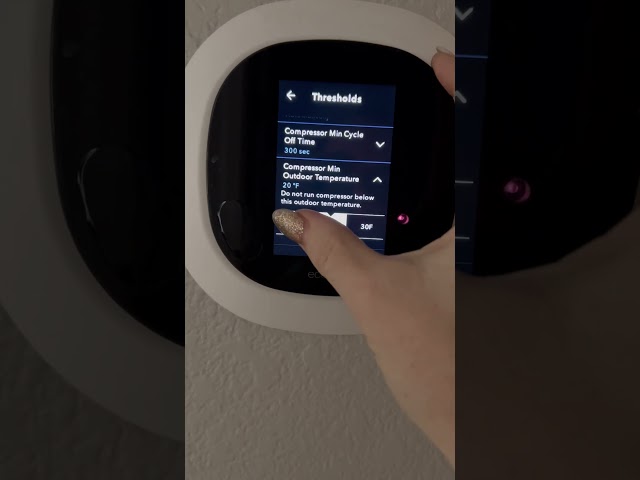
Introduction
Is your ecobee thermostat displaying an error, blowing warm air, or simply refusing to turn on your air conditioner? This can be incredibly frustrating, especially during hot weather! A non-functioning AC system can quickly lead to discomfort and potentially even health issues. Whether it’s a minor setting issue or a more complex electrical problem, it’s important to address the issue quickly to restore cooling comfort to your home. This guide will walk you through common causes and troubleshooting steps to get your ecobee-controlled AC back up and running.
Common Causes of ecobee ac not working
Here are some of the most frequent reasons why your ecobee might not be controlling your AC properly:
- Incorrect Thermostat Settings: Simple things like the thermostat being in “Heat” mode or the fan being set to “On” instead of “Auto” can prevent the AC from cooling.
- Wiring Issues: Loose or incorrect wiring between the ecobee and your HVAC system can disrupt communication.
- Tripped Circuit Breaker: A power surge or overload can trip the circuit breaker that powers your AC unit.
- Clogged Air Filter: A dirty air filter restricts airflow, causing the AC to work harder and potentially shut down.
- Frozen Evaporator Coil: Restricted airflow (often due to a dirty filter) can cause the evaporator coil inside your AC unit to freeze.
- Condensate Drain Line Blockage: The AC produces condensation, which drains through a pipe. If this pipe is blocked, it can trigger a safety shut-off.
- Ecobee Software Glitch: Occasionally, software bugs can cause the thermostat to malfunction.
- HVAC System Problems: The problem might not be the ecobee at all, but rather a problem within the AC unit itself (e.g., a faulty compressor).
- Loss of WiFi Connection: While your AC should still run, loss of WiFi may stop schedule and remote use through the app.
Symptoms Checklist
Use this checklist to help pinpoint the problem:
- The ecobee thermostat screen is blank.
- The thermostat displays an error message related to cooling.
- The thermostat is set to “Cool” mode, but the AC is blowing warm air.
- The fan is running, but the air isn’t cold.
- The AC unit outside isn’t running.
- You hear unusual noises coming from the AC unit.
- The circuit breaker for the AC is tripped.
- The ecobee app shows the AC as “offline” or unresponsive.
How to Fix ecobee ac not working Step-by-Step Guide
Follow these steps to troubleshoot your ecobee and AC system:
- Check the Thermostat Mode: Ensure the ecobee is set to “Cool” mode.
- Verify the Set Temperature: Make sure the desired temperature is set lower than the current room temperature.
- Set Fan to “Auto”: Set the fan setting to “Auto” instead of “On” so the fan only runs when the AC is cooling.
- Check the Circuit Breaker: Locate the circuit breaker panel and check the breaker labeled “AC” or “HVAC”. If it’s tripped (in the “off” or middle position), flip it fully to the “off” position, then back to the “on” position.
- Inspect the Air Filter: Remove the air filter and inspect it for dirt and debris. If it’s dirty, replace it with a clean filter of the correct size.
- Restart Your Ecobee: You can restart ecobee by pulling it gently from the wall, wait for 2-3 mins, and push it back until you hear a ‘click’ sound.
- Check Wiring: Gently remove the ecobee from the wall plate. Carefully inspect the wiring connections to ensure they are securely attached and match the wiring diagram in the ecobee manual. If you’re not comfortable with electrical work, skip this step.
- Inspect the Outdoor Unit: Check the outdoor AC unit for any visible obstructions (e.g., leaves, debris) blocking airflow.
- Check the Condensate Drain Line: Locate the condensate drain line (usually a PVC pipe near the indoor unit). Make sure it’s not blocked. You can try to carefully flush it with a wet/dry vacuum or pour a cup of diluted bleach down the drain to clear any algae buildup.
- Reset Ecobee to Factory Settings: As a last resort, you can try resetting the ecobee to its factory settings. This will erase all your settings, so only do this if other steps haven’t worked. The menu options will be in Settings > Reset > Reset All Settings.
- Check the WiFi Connection: Open the ecobee app and check if the thermostat is online. If not, reconnect it to your WiFi network.
- Consult Ecobee Support: If none of the above steps work, visit the ecobee website or call their customer support for further assistance.
Fix the Issue Without Buying Parts
Here are some free methods to try:
- Thermostat Reset: As mentioned above, restarting your ecobee can often resolve temporary glitches.
- Air Filter Cleaning/Replacement: Regularly cleaning or replacing your air filter is crucial for maintaining good airflow.
- Condensate Drain Line Clearing: Regularly flushing the condensate drain line can prevent blockages.
- Visual Inspection: Routinely inspect the indoor and outdoor AC units for any visible issues like ice buildup or debris.
When Replacement Might Be Necessary
If you’ve tried all the troubleshooting steps and your AC still isn’t working, the problem might be a failing component within the AC unit itself. Common parts that fail include the compressor, fan motor, or control board. Replacing these parts can be costly, ranging from $300 to $1500+ depending on the part and the complexity of the repair. Consider consulting with a qualified HVAC technician for diagnosis and repair before considering replacement. It’s possible the Ecobee itself is faulty, but this is less common.
Safety Warning
- Always turn off the power to the AC unit at the circuit breaker before performing any maintenance or repairs.
- Never work on electrical components with wet hands or on a wet floor.
- If you’re not comfortable working with electrical wiring, consult a qualified electrician or HVAC technician.
- Be careful when handling tools and avoid dropping them on sensitive components.
Tools You May Need
- Screwdriver (Phillips and flathead)
- Pliers
- Multimeter (for testing voltage – optional and requires knowledge of electrical safety)
- Wet/Dry Vacuum (for clearing condensate drain line)
- New Air Filter (correct size for your unit)
FAQ
Here are some frequently asked questions:
-
Q: My ecobee says “Cooling Disabled”. What does that mean?
A: This usually indicates that the ecobee has detected a fault condition, such as a low or high temperature. Check the wiring and settings. -
Q: How often should I replace my air filter?
A: It’s recommended to replace your air filter every 1-3 months, depending on the type of filter and how often you use your AC. -
Q: My AC is making a loud buzzing noise. What could be wrong?
A: A loud buzzing noise could indicate a problem with the compressor or fan motor. Consult an HVAC technician. -
Q: Can I use any type of air filter for my AC?
A: No. Always use the correct size and type of air filter recommended by the manufacturer of your AC unit.
Conclusion
Troubleshooting your ecobee-controlled AC system can seem daunting, but by following these steps, you can often identify and resolve the issue yourself. Remember to prioritize safety and consult with a qualified technician if you’re not comfortable performing any of the steps. With a little patience and effort, you can get your AC back up and running and enjoy a comfortable home environment.
Youtube Video:
Looking for more useful options?
Check out recommended resources that others find helpful.