
Introduction
Is your Ecobee thermostat refusing to cooperate with your air conditioner? This is a common issue that can leave you sweltering in the heat, especially during the peak of summer. When your Ecobee isn’t properly communicating with your AC, it can mean your home isn’t being cooled efficiently, or worse, your AC simply won’t turn on. This guide will walk you through troubleshooting steps to get your AC and Ecobee working together again, saving you money and keeping you comfortable.
💡 Technical Key Takeaways:
- Core Focus: Diagnostic schematic and terminal connection layout for Ac Not Working With Ecobee.
- Target Scope: Field technicians, automotive DIYers, and residential/commercial electricians.
- Safety Rule: Always disconnect the primary power source/battery terminal and verify zero voltage with a multimeter before touching wires.
Common Causes of AC Not Working with Ecobee
Several factors can cause this frustrating problem:
- Wiring Issues: Loose or incorrect wiring between your Ecobee and your HVAC system is a frequent culprit.
- Power Outage: A power surge or outage can disrupt the connection between your devices.
- Incorrect Configuration: The settings on your Ecobee might not be properly configured to control your specific AC unit.
- C-Wire Problems: Many Ecobee thermostats require a “C-wire” (common wire) for power. If it’s missing or improperly connected, the thermostat might not function correctly.
- Blown Fuse: A blown fuse in your HVAC system’s control panel can prevent the AC from receiving power.
- Thermostat Compatibility: Though rare, your older AC system might not be fully compatible with the features of your newer Ecobee.
- Software Glitches: Like any electronic device, your Ecobee can experience temporary software glitches.
- Faulty Ecobee Thermostat: In rare cases, the thermostat itself may be defective.
- HVAC System Issues: The problem might not be the Ecobee at all, but a fault within your AC unit (compressor, fan motor, etc.).
Symptoms Checklist
Look for these signs to confirm the issue:
- The Ecobee thermostat displays an error message related to cooling or HVAC connection.
- The thermostat appears to be working, but the AC unit doesn’t turn on.
- The AC turns on briefly and then shuts off immediately.
- The AC runs constantly, even when the desired temperature has been reached.
- The Ecobee display is blank or unresponsive.
- You can hear the fan running, but the air coming from the vents is not cool.
How to Fix AC Not Working with Ecobee Step-by-Step Guide
- Check the Power: Ensure both the Ecobee and your AC unit are receiving power. Check the breaker in your electrical panel.
- Restart the Ecobee: Turn off the Ecobee by removing it from its base plate, wait 30 seconds, and then reattach it.
- Verify Wiring Connections: Carefully inspect the wiring connections at both the Ecobee and the HVAC control board. Ensure all wires are securely connected to the correct terminals. Consult your Ecobee manual or a wiring diagram for guidance.
- Check the C-Wire: Make sure the C-wire is properly connected if your Ecobee requires it. Some installations might require an adapter.
- Examine the Fuse: Locate the fuse in your HVAC unit’s control panel. If it’s blown, replace it with a fuse of the same amperage.
- Review Ecobee Settings: Double-check that your Ecobee is set to “Cool” mode and that the desired temperature is lower than the current room temperature.
- Check the Fan Setting: Ensure that the fan setting on the Ecobee is set to “Auto” and not “On.” If set to “On” the fan will always run, potentially masking other cooling problems.
- Inspect Air Filter: A clogged air filter can restrict airflow and prevent the AC from cooling properly. Replace the air filter if it’s dirty.
- Run a Test Cycle: From the Ecobee menu, initiate a test cycle to see if the AC will start.
- Check for Error Codes: Note any error codes displayed on the Ecobee and consult the Ecobee support website for information on the code’s meaning.
- Update Firmware: Make sure your Ecobee has the latest firmware installed. Check the Ecobee app or website for updates.
- Reset to Factory Settings: As a last resort, try resetting your Ecobee to its factory settings. Note that this will erase your current settings. Consult your Ecobee manual.
- Call Ecobee Support: If none of the above steps work, contact Ecobee support for further assistance.
Fix the Issue Without Buying Parts
Often, you can resolve the issue without purchasing new components:
- Reset: Restarting the Ecobee can resolve temporary software glitches.
- Cleaning: Dusting the Ecobee can improve airflow around the sensors.
- Inspection Tips: Visually inspect the wiring and fuse for any signs of damage.
- Maintenance Basics: Regularly changing the air filter improves AC efficiency.
When Replacement Might Be Necessary
If the issue persists after troubleshooting, it’s possible the Ecobee thermostat or a component of your AC unit needs replacement.
- Ecobee Thermostat: If the display is unresponsive or the thermostat consistently malfunctions, replacement might be necessary (Estimated cost: $150-$300).
- AC Unit Components: If the AC unit’s compressor, fan motor, or other parts are faulty, professional repair or replacement might be required (Estimated cost varies greatly depending on the part).
Safety Warning
- Always turn off the power to your HVAC system at the breaker before working on any wiring.
- Avoid working on electrical components with wet hands or on wet floors.
- If you’re uncomfortable working with electrical wiring, consult a qualified HVAC technician.
Tools You May Need
- Screwdriver (Phillips and flathead)
- Pliers
- Multimeter (optional, for testing voltage)
- Flashlight
FAQ
- Q: My Ecobee says “No Power to R Wire.” What does this mean? A: This usually indicates a problem with the wiring to the “R” terminal, which is the power wire. Check the connections at both the Ecobee and the HVAC control board.
- Q: Why is my AC short cycling (turning on and off frequently)? A: Short cycling can be caused by a dirty air filter, incorrect thermostat settings, or a problem with the AC unit itself.
- Q: How do I know if my Ecobee is compatible with my AC system? A: Consult the Ecobee compatibility checker on their website or contact Ecobee support.
- Q: My Ecobee is constantly displaying an error message. What should I do? A: Note the error code and consult the Ecobee support website or contact Ecobee support.
Conclusion
Troubleshooting your AC and Ecobee connection issues can seem daunting, but by following these steps, you can often resolve the problem yourself. Don’t hesitate to try these fixes before calling a technician. However, if you’re uncomfortable or unsure about any step, or if the problem persists, it’s always best to consult a qualified HVAC professional.
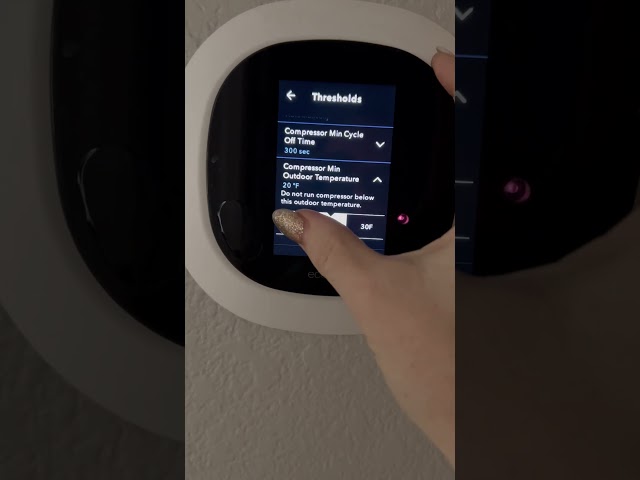
Youtube Video:
Quick Wiring Specifications & Terminal Guide
| Component / Circuit | Standard Wire Gauge | Recommended Protection |
|---|---|---|
| Control & Trigger Signals | 18 – 20 AWG | 5A – 7.5A Inline Fuse |
| Standard Auxiliary Load | 14 – 16 AWG | 15A – 20A Circuit Breaker |
| Main Power Feed / Supply | 10 – 12 AWG | 30A – 40A Heavy-Duty Relay |
Images References
Looking for more diagnostic guides? Explore our complete Air Conditioner Troubleshooting 3 section for step-by-step troubleshooting solutions.
