
Introduction
A refrigerator relies on a system of components to keep your food cold. One crucial component is the condenser fan. This fan cools the condenser coils, which release heat from the refrigerant. If your Samsung refrigerator condenser fan isn’t working, the refrigerator can’t cool properly, leading to rising temperatures inside. This can cause your food to spoil quickly. It’s important to address this issue promptly to prevent food waste and further damage to your refrigerator.
💡 Technical Key Takeaways:
- Core Focus: Diagnostic schematic and terminal connection layout for Samsung Refrigerator Condenser Fan Not Working.
- Target Scope: Field technicians, automotive DIYers, and residential/commercial electricians.
- Safety Rule: Always disconnect the primary power source/battery terminal and verify zero voltage with a multimeter before touching wires.
Common Causes of Samsung Refrigerator Condenser Fan Not Working
Here are some common reasons why your Samsung refrigerator condenser fan might not be working:
- Power Issues: The refrigerator might not be getting enough power, preventing the fan from running.
- Fan Blade Obstruction: Dust, debris, or ice build-up can block the fan blades, stopping them from spinning.
- Frozen Fan Motor: Ice accumulation around the fan motor can prevent it from starting.
- Faulty Fan Motor: The motor itself may have worn out and stopped working.
- Wiring Problems: Damaged or loose wires connecting the fan motor can interrupt the power supply.
- Defective Start Capacitor: The capacitor that helps start the fan motor might be failing.
- Control Board Issues: A malfunctioning control board might not be sending the signal to turn on the fan.
- Overloaded Refrigerator: Packing too much food into the refrigerator can restrict airflow, causing the compressor and condenser to work harder, potentially affecting the fan.
Symptoms Checklist
Look for these signs to confirm if your condenser fan is the problem:
- The refrigerator is not cooling as well as it used to.
- The freezer might be working, but the refrigerator compartment is warm.
- You hear the compressor running, but the condenser fan is silent.
- The back of the refrigerator feels unusually hot.
- You see frost buildup on the back wall inside the freezer.
- The refrigerator is making unusual humming or buzzing noises.
- The refrigerator is running more frequently or for longer periods.
How to Fix Samsung Refrigerator Condenser Fan Not Working Step-by-Step Guide
Follow these steps to troubleshoot your condenser fan:
- Unplug the Refrigerator: Disconnect the refrigerator from the power outlet for safety.
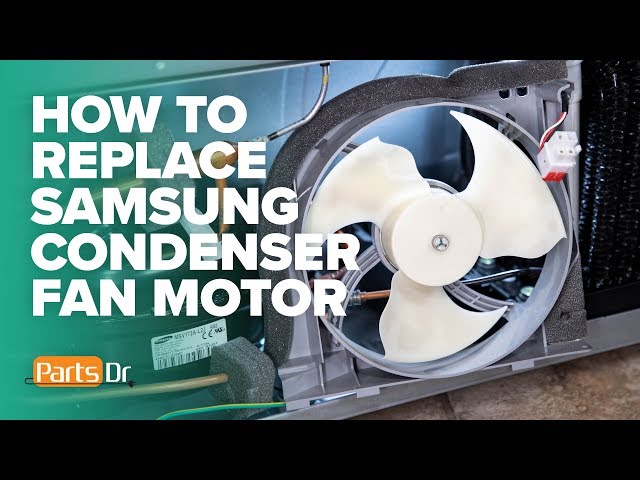
- Locate the Condenser Fan: The condenser fan is usually located behind the refrigerator, near the bottom. You may need to remove a back panel.
- Inspect for Obstructions: Check the fan blades for any visible obstructions like dust, debris, pet hair, or ice.
- Clean the Fan Blades: Carefully clean the fan blades with a soft brush or cloth. Remove any debris.
- Check for Ice Buildup: If you see ice around the fan, try melting it with a hairdryer on a low setting (avoid getting water on electrical components).
- Manually Spin the Fan: Try gently spinning the fan blades with your hand. Do they spin freely, or do they feel stiff?
- Inspect the Wiring: Look for any loose, damaged, or corroded wires connected to the fan motor.
- Test the Fan Motor (Advanced): If you are comfortable using a multimeter, you can test the fan motor for continuity. (This requires electrical knowledge if you’re unsure, skip this step.)
- Check the Start Capacitor (Advanced): If your refrigerator has a start capacitor for the fan, inspect it for signs of damage, such as bulging or leaking. (Again, this requires some electrical knowledge.)
- Check the Condenser Coils: While you have the back panel off, inspect the condenser coils. Dirty coils can cause the fan to work harder. Clean them with a vacuum cleaner brush attachment.
- Plug the Refrigerator Back In: After cleaning and inspecting, plug the refrigerator back into the power outlet.
- Observe the Fan: Watch to see if the condenser fan starts running.
- Listen for the Fan: If the fan doesn’t start immediately, listen carefully. You might hear a humming sound, indicating that the motor is trying to start.
- Give It Time: Sometimes, it can take a few minutes for the refrigerator to cycle and the fan to turn on. Wait at least 30 minutes.
- Monitor the Refrigerator Temperature: After the fan starts, monitor the refrigerator’s temperature to ensure it’s cooling properly.
Fix the Issue Without Buying Parts
Before considering replacing parts, try these free methods:
- Refrigerator Reset: Unplug the refrigerator for 30 minutes and then plug it back in. This can sometimes reset the control board.
- Thorough Cleaning: Clean the condenser coils and fan blades thoroughly. Dust and debris are common culprits.
- Airflow Optimization: Ensure proper airflow inside the refrigerator. Avoid overcrowding shelves.
- Door Seal Inspection: Check the door seals for any gaps or damage. Leaky seals force the refrigerator to work harder.
When Replacement Might Be Necessary
If the fan motor still doesn’t work after troubleshooting, replacement might be needed. A new condenser fan motor typically costs between $50 and $150 USD, depending on the model. The start capacitor (if applicable) is a less expensive part, usually around $10-$30 USD. The condenser fan motor and start capacitor are the most commonly failing parts in this scenario. If the control board is defective, replacement can be expensive ($150 – $300 USD plus professional installation).
Safety Warning
- Always unplug the refrigerator before performing any maintenance or repairs.
- Avoid working on electrical appliances near water or on wet floors.
- Be careful when handling sharp objects or tools.
- If you are uncomfortable with electrical repairs, contact a qualified appliance technician.
Tools You May Need
- Screwdrivers (Phillips and Flathead)
- Soft Brush or Cloth
- Vacuum Cleaner with Brush Attachment
- Hair Dryer (for melting ice)
- Multimeter (Optional, for advanced testing)
FAQ
Here are some frequently asked questions:
-
Q: How do I know if the condenser fan is the problem and not the evaporator fan?
A: The condenser fan is located at the back of the refrigerator, near the bottom. The evaporator fan is inside the freezer compartment. If the refrigerator is warm but the freezer is cold, the condenser fan is more likely to be the problem. -
Q: Can I run the refrigerator with a broken condenser fan temporarily?
A: It’s not recommended. Running the refrigerator without a working condenser fan can damage the compressor and lead to more expensive repairs. -
Q: How often should I clean the condenser coils?
A: Ideally, you should clean the condenser coils every 6 months. -
Q: Why is my refrigerator hot to the touch on the outside?
A: The sides of the refrigerator can get warm due to the condenser coils releasing heat. However, if it’s excessively hot, it could indicate a problem with the cooling system, including the condenser fan. -
Q: My Samsung refrigerator has two fans in the back. Which one is the condenser fan?
A: Typically, the condenser fan is the one located closer to the compressor, usually at the bottom of the refrigerator’s back panel.
Conclusion
Troubleshooting a non-working condenser fan can seem daunting, but by following these steps, you can often identify and resolve the issue yourself. Remember to prioritize safety and take your time. If you’re uncomfortable with any of the steps or the problem persists, don’t hesitate to call a qualified appliance technician for professional assistance. Starting with these DIY checks can save you time and money!
Youtube Video:
Quick Wiring Specifications & Terminal Guide
| Component / Circuit | Standard Wire Gauge | Recommended Protection |
|---|---|---|
| Control & Trigger Signals | 18 – 20 AWG | 5A – 7.5A Inline Fuse |
| Standard Auxiliary Load | 14 – 16 AWG | 15A – 20A Circuit Breaker |
| Main Power Feed / Supply | 10 – 12 AWG | 30A – 40A Heavy-Duty Relay |
Images References
Looking for more diagnostic guides? Explore our complete Refrigerator Problems 5 section for step-by-step troubleshooting solutions.
