
Introduction
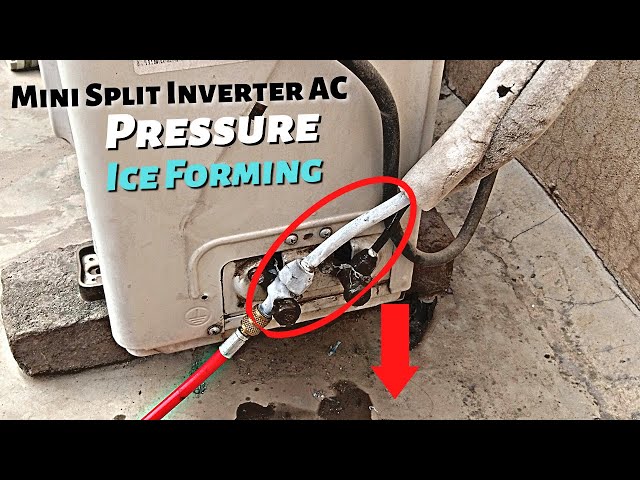
A mini split AC freezing up is a common problem that can prevent your home from cooling properly. When this happens, ice forms on the indoor unit’s coils, blocking airflow and reducing the system’s efficiency. This not only makes your home uncomfortable but can also lead to more serious damage to your AC unit if left unaddressed. It often occurs when the system is working overtime, during periods of high humidity, or due to poor maintenance. Addressing this issue promptly is essential to restore your AC’s cooling capacity and prevent costly repairs.
💡 Technical Key Takeaways:
- Core Focus: Diagnostic schematic and terminal connection layout for Mini Split Ac Freezing Up.
- Target Scope: Field technicians, automotive DIYers, and residential/commercial electricians.
- Safety Rule: Always disconnect the primary power source/battery terminal and verify zero voltage with a multimeter before touching wires.
Common Causes of Mini Split AC Freezing Up
Here are several reasons why your mini split AC might be freezing up:
- Dirty Air Filter: A clogged filter restricts airflow, causing the evaporator coils to get too cold and freeze.
- Low Refrigerant: Insufficient refrigerant reduces the coil temperature, leading to ice formation.
- Blocked Airflow: Obstructions like furniture or curtains near the indoor unit can reduce airflow and cause freezing.
- Dirty Evaporator Coils: Dust and dirt on the coils insulate them, preventing proper heat exchange and causing ice buildup.
- Blower Fan Problems: A malfunctioning blower fan can reduce airflow over the coils, leading to freezing.
- Outside Temperature Too Low: Running the AC when it’s too cold outside (below 60F or the manufacturer’s recommended minimum) can cause freezing.
- Refrigerant Leaks: Slow leaks deplete refrigerant over time, eventually causing freezing.
- Faulty Thermostat: An incorrectly calibrated thermostat can cause the unit to run continuously, leading to icing.
Symptoms Checklist
Check for these indicators to confirm your mini split AC is freezing up:
- Visible ice buildup on the indoor unit’s coils.
- Reduced or no airflow coming from the unit.
- The unit is running constantly but not cooling effectively.
- Unusual noises coming from the indoor unit.
- Water dripping from the indoor unit (when the ice melts).
How to Fix Mini Split AC Freezing Up Step-by-Step Guide
Follow these steps to troubleshoot and fix a freezing mini split AC:
- Turn Off the AC: Switch off the AC unit completely to allow the ice to melt. This may take several hours.
- Check the Air Filter: Remove the air filter and inspect it for dirt and debris.
- Clean or Replace the Air Filter: If the filter is dirty, clean it with water and mild detergent or replace it with a new one. Ensure it’s completely dry before re-installing.
- Inspect the Indoor Unit for Obstructions: Make sure nothing is blocking the airflow around the indoor unit. Move any furniture or curtains that might be restricting air circulation.
- Clean the Evaporator Coils: Use a soft brush or a vacuum with a brush attachment to gently remove dust and dirt from the coils. You can also use a fin comb to straighten any bent fins.
- Check the Outdoor Unit for Obstructions: Ensure the outdoor unit is free from debris like leaves, grass clippings, or snow. Clear away any obstructions around the unit.
- Inspect the Blower Fan: Open the indoor unit carefully and check the blower fan for any obstructions. Make sure the fan is spinning freely.
- Restart the AC: After the ice has melted and you’ve cleaned the filter and coils, turn the AC back on and monitor its performance.
- Adjust the Thermostat: Set the thermostat to a slightly higher temperature to prevent the unit from running constantly.
- Check for Refrigerant Leaks (Visual): Look for signs of oil residue or leaks on the refrigerant lines connected to both the indoor and outdoor units. (Note: Repairing refrigerant leaks requires a professional).
- Ensure Proper Ventilation: Make sure the room where the indoor unit is located is adequately ventilated.
- Check the Temperature Settings: Avoid setting the temperature too low, as this can cause the unit to work harder and freeze up.
- Run the Fan Only Mode: Periodically running the AC in fan-only mode can help prevent ice buildup by circulating air and drying out the coils.
- Consider a System Reset: Turn off the power to the AC at the breaker for a few minutes, then turn it back on. This can sometimes reset the system and resolve minor issues.
Fix the Issue Without Buying Parts
Often, you can resolve a freezing mini split AC without buying new parts:
- Resetting the System: As mentioned above, a simple power reset can sometimes fix the issue.
- Thorough Cleaning: Regular cleaning of the air filter and coils is crucial for maintaining proper airflow.
- Ventilation: Ensure adequate ventilation around the indoor and outdoor units to promote airflow.
- Temperature Adjustment: Raising the thermostat temperature can prevent the unit from overworking and freezing.
- Routine Inspection: Regularly inspect the unit for signs of ice buildup or obstructions.
- Regular Maintenance: Schedule professional maintenance at least once a year to ensure the system is running efficiently.
When Replacement Might Be Necessary
If the problem persists after trying the above steps, or if you notice any of the following, replacement might be necessary:. For more related activities, check out our My O General Ac Is Not Cooling.
- Refrigerant Leak: (Professional Repair Needed, Cost Dependent on Severity)
- Compressor Failure: (Replacement Cost: $500 – $1500 USD)
- Blower Motor Failure: (Replacement Cost: $200 – $500 USD)
- Control Board Malfunction: (Replacement Cost: $150 – $400 USD)
Safety Warning
Follow these safety precautions when troubleshooting your mini split AC:
- Always turn off the power to the unit at the breaker before performing any maintenance or repairs.
- Avoid touching any electrical components with wet hands.
- Be careful when working at heights to avoid falls.
- If you are not comfortable performing any of these steps, contact a qualified HVAC technician.
Tools You May Need
Here are some tools that might be helpful for troubleshooting:
- Screwdrivers (Phillips and Flathead)
- Vacuum Cleaner with Brush Attachment
- Soft Brush
- Fin Comb
- Air Filter Cleaning Solution
- Flashlight
FAQ
Here are some frequently asked questions about mini split AC freezing up:
-
Q: How often should I clean my air filter?
A: You should clean or replace your air filter every 1-3 months, depending on how often you use the AC and the air quality in your home. -
Q: Can I use a regular household cleaner to clean the evaporator coils?
A: No, it’s best to use a specialized coil cleaner or a mild detergent solution. Avoid harsh chemicals that could damage the coils. -
Q: What should I do if I suspect a refrigerant leak?
A: Contact a qualified HVAC technician immediately. Refrigerant leaks can be harmful and require professional repair. -
Q: How can I prevent my mini split AC from freezing up in the future?
A: Regularly clean the air filter and coils, ensure proper airflow around the unit, avoid setting the temperature too low, and schedule routine maintenance.
Conclusion
Addressing a freezing mini split AC can often be achieved with simple troubleshooting steps. By cleaning the filter and coils, ensuring proper airflow, and monitoring the system’s performance, you can often restore your AC’s cooling capacity. However, if the problem persists or you’re uncomfortable with any of the steps, it’s always best to call a qualified HVAC technician. Don’t hesitate to try these DIY methods first, as you could save yourself time and money.
Youtube Video:
Quick Wiring Specifications & Terminal Guide
| Component / Circuit | Standard Wire Gauge | Recommended Protection |
|---|---|---|
| Control & Trigger Signals | 18 – 20 AWG | 5A – 7.5A Inline Fuse |
| Standard Auxiliary Load | 14 – 16 AWG | 15A – 20A Circuit Breaker |
| Main Power Feed / Supply | 10 – 12 AWG | 30A – 40A Heavy-Duty Relay |
Images References
Looking for more diagnostic guides? Explore our complete Air Conditioner Troubleshooting 5 section for step-by-step troubleshooting solutions.
