
Introduction
An LG fridge knocking sound can be quite alarming and usually indicates that something is not working correctly. This noise, often described as a rhythmic tapping or banging, can be caused by various factors within the refrigerator. Ignoring this noise could lead to bigger problems and potential appliance failure, so it’s important to address it as soon as possible. This guide will walk you through common causes and step-by-step troubleshooting to help resolve the issue yourself before calling a technician.
💡 Technical Key Takeaways:
- Core Focus: Diagnostic schematic and terminal connection layout for Lg Fridge Knocking Sound.
- Target Scope: Field technicians, automotive DIYers, and residential/commercial electricians.
- Safety Rule: Always disconnect the primary power source/battery terminal and verify zero voltage with a multimeter before touching wires.
Common Causes of lg fridge knocking sound
Here are some common reasons your LG fridge might be making a knocking sound:
- Ice Maker Issues: A malfunctioning ice maker can cause knocking as ice cubes get stuck or the mechanism tries to dispense ice.
- Water Line Problems: A loose or vibrating water line connected to the ice maker can create a knocking sound.
- Compressor Start-Up: The compressor, which cools the fridge, might make a knocking sound when it starts up, especially if it’s aging.
- Condenser Fan Obstruction: If something is blocking the condenser fan (usually located at the back), it can make a knocking noise.
- Evaporator Fan Issues: Ice buildup or debris interfering with the evaporator fan (inside the fridge) can cause knocking.
- Defrost System Malfunction: Problems with the defrost system can lead to ice accumulation, which then impacts fan operation and causes noise.
- Loose Components: Sometimes, interior shelves, drawers, or even the fridge itself might be slightly loose and vibrate, creating a knocking sound.
- Unit Not Level: If your fridge isn’t level, it can cause internal components to vibrate against each other, resulting in a knocking noise.
Symptoms Checklist
Use this checklist to identify the type of knocking sound you’re hearing:
- Knocking only when the ice maker is running.
- Knocking sound from the back of the fridge.
- Knocking sound that seems to come from inside the fridge compartment.
- Knocking accompanied by other noises, such as buzzing or grinding.
- Knocking that stops after a while.
- Knocking that only happens when the fridge starts cooling.
- The fridge isn’t as cold as it used to be.
- There’s excessive ice buildup inside.
How to Fix lg fridge knocking sound Step-by-Step Guide
Follow these steps to troubleshoot the knocking sound:
- Unplug the Fridge: Always disconnect the refrigerator from the power outlet before performing any maintenance or checks. This is crucial for your safety.
- Check the Ice Maker: If the knocking sound happens when the ice maker runs, try turning the ice maker off. If the noise stops, clean the ice maker thoroughly. Remove any ice buildup or obstructions.
- Inspect the Water Line: Locate the water line connected to the back of the fridge. Ensure it’s securely connected and isn’t vibrating against anything. Use foam or padding to insulate the line if necessary.
- Level the Fridge: Use a level to check if the fridge is sitting evenly on the floor. Adjust the leveling feet until the fridge is perfectly level.
- Clean the Condenser Coils: Locate the condenser coils (usually at the back or bottom of the fridge). Use a vacuum cleaner with a brush attachment to remove dust and debris. This improves airflow and reduces compressor strain.
- Check the Condenser Fan: Locate the condenser fan near the compressor. Make sure it’s free from obstructions. Remove any debris that may be blocking the fan blades. Gently spin the fan to ensure it rotates freely.
- Inspect the Evaporator Fan: The evaporator fan is inside the fridge, usually behind a panel in the freezer compartment. (Warning: if attempting this, unplug the fridge again to avoid accidental exposure to electrical components). Check for ice buildup or obstructions. Melt any ice with a hairdryer (on a low setting) and remove any debris.
- Empty and Organize the Fridge: Remove all items from the fridge and freezer. Check for loose shelves, drawers, or containers that could be vibrating. Reorganize the contents to prevent items from touching the back panel.
- Run a Defrost Cycle: Initiate a manual defrost cycle (refer to your LG fridge’s manual for instructions). This can help melt ice buildup that might be causing the noise.
- Listen Closely: After each step, plug the fridge back in (briefly) and listen to see if the knocking sound has diminished. This helps identify the source of the problem.
- Check the Compressor: The compressor is usually located at the bottom rear of the fridge. If the knocking sound seems to originate from the compressor, it may be a sign of a more serious issue, such as wear and tear. (Advanced users only, skip for beginners).
Fix the Issue Without Buying Parts
Often, the knocking sound can be resolved without purchasing new parts:
- Fridge Reset: Unplug the fridge for 30 minutes, then plug it back in. This can sometimes reset the control system and resolve minor issues.
- Deep Cleaning: Regularly clean the inside and outside of your fridge, including the condenser coils.
- Proper Loading: Avoid overpacking the fridge, which can restrict airflow and cause components to work harder, leading to noise.
- Regular Inspection: Periodically check for loose components, ice buildup, and debris to prevent problems before they start.
When Replacement Might Be Necessary
If the knocking sound persists after trying these troubleshooting steps, and especially if it originates from the compressor itself, replacement might be necessary. Compressors are complex components and are not usually DIY-repairable. Replacing a compressor can cost between $300 and $700, including labor. Other parts that might require replacement include the condenser fan motor or the evaporator fan motor (costing $50-$200 each).
Safety Warning
- Always unplug the refrigerator before attempting any repairs.
- Avoid working on the fridge with wet hands or on a wet floor.
- Be careful when using a hairdryer to melt ice, as excessive heat can damage plastic components.
- If you are unsure about any step, consult a qualified appliance repair technician.
Tools You May Need
- Screwdriver (Phillips and flathead)
- Vacuum cleaner with brush attachment
- Level
- Hair dryer
- Foam or padding (for water line insulation)
- Flashlight
FAQ
Here are some frequently asked questions:
- Q: Why is my fridge knocking even when the ice maker is off? A: It could be the condenser or evaporator fan, the compressor, or loose components. Follow the troubleshooting steps in this guide.
- Q: How often should I clean the condenser coils? A: At least every six months, or more often if you have pets.
- Q: Is it normal for my fridge to make some noise? A: Yes, some humming or clicking sounds are normal as the fridge cycles. However, a loud or persistent knocking sound is not normal and requires attention.
- Q: Can a dirty air filter cause a knocking sound? A: While less common, a very dirty air filter can restrict airflow and cause the fridge to work harder, which could indirectly contribute to unusual noises. Clean or replace the air filter.
Conclusion
Don’t let a knocking sound from your LG fridge disrupt your kitchen’s peace. By following these troubleshooting steps, you can often identify and resolve the issue yourself. Remember to prioritize safety and take your time. If you’re still hearing the noise after trying these tips, it might be time to call a qualified appliance repair technician. Good luck!
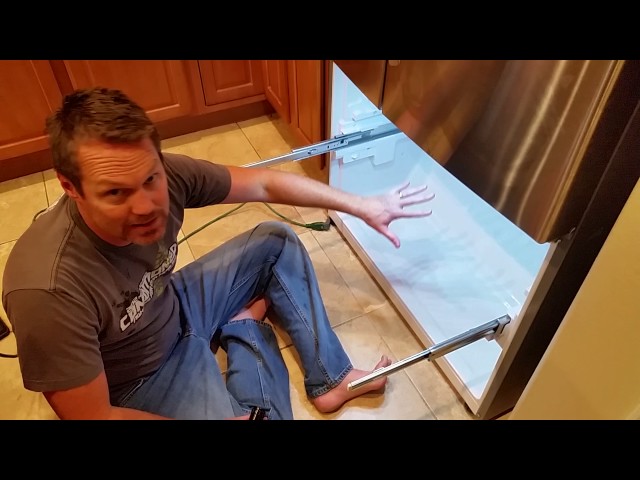
Youtube Video:
Quick Wiring Specifications & Terminal Guide
| Component / Circuit | Standard Wire Gauge | Recommended Protection |
|---|---|---|
| Control & Trigger Signals | 18 – 20 AWG | 5A – 7.5A Inline Fuse |
| Standard Auxiliary Load | 14 – 16 AWG | 15A – 20A Circuit Breaker |
| Main Power Feed / Supply | 10 – 12 AWG | 30A – 40A Heavy-Duty Relay |
Images References
Looking for more diagnostic guides? Explore our complete Refrigerator Problems 4 section for step-by-step troubleshooting solutions.
