
Introduction
When your central air conditioner is running but the fan isn’t blowing air into your home, it can be incredibly frustrating and uncomfortable, especially during hot weather. This issue, where the central air fan isn’t blowing, can stem from a variety of problems, ranging from simple fixes to more complex mechanical failures. Addressing this promptly is important because a non-functional fan can lead to overheating, higher energy bills, and potential damage to your air conditioning system. Don’t worry, many times you can troubleshoot this yourself before calling a professional.
💡 Technical Key Takeaways:
- Core Focus: Diagnostic schematic and terminal connection layout for Central Air Fan Not Blowing.
- Target Scope: Field technicians, automotive DIYers, and residential/commercial electricians.
- Safety Rule: Always disconnect the primary power source/battery terminal and verify zero voltage with a multimeter before touching wires.
Common Causes of central air fan not blowing
Here are some common reasons why your central air fan might not be blowing:
- Tripped Circuit Breaker: The circuit breaker powering your AC unit may have tripped.
- Dirty Air Filter: A clogged air filter restricts airflow, causing the system to work harder and potentially shut down the fan.
- Frozen Evaporator Coil: A frozen coil restricts airflow, preventing the fan from blowing properly.
- Faulty Capacitor: The capacitor helps start and run the fan motor. If it’s weak or failed, the fan won’t spin.
- Bad Fan Motor: The fan motor itself could be damaged or burned out.
- Thermostat Issues: An incorrectly set or malfunctioning thermostat might not be signaling the fan to turn on.
- Blocked Vents: Closed or blocked vents can increase pressure in the system.
- Ductwork Leaks: Leaks in the ductwork can reduce the efficiency of the airflow.
Symptoms Checklist
Check these indicators to accurately identify the issue:
- The AC unit is running (you can hear the compressor), but no air is coming out of the vents.
- You hear a humming noise from the AC unit but the fan isn’t spinning.
- The air coming from the vents is warm instead of cool.
- The circuit breaker for the AC unit has tripped.
- Ice is visible on the copper lines or the evaporator coil inside the unit.
- The thermostat is set to “cool” and the fan is set to “auto” or “on,” but nothing happens.
How to Fix central air fan not blowing Step-by-Step Guide
Follow these steps to troubleshoot the issue:
- Turn off the AC: Go to your thermostat and turn the system to the “off” position. Then, switch off the breaker that powers the AC unit.
- Check the Circuit Breaker: Locate the circuit breaker for your AC unit in the electrical panel. If it’s tripped (in the middle position), flip it all the way to the “off” position and then back to the “on” position.
- Replace Air Filter: Locate the air filter (usually behind a vent grill or in the indoor unit). Remove the old filter and replace it with a new one. Make sure the arrow on the filter points in the direction of airflow.
- Check for Ice: Inspect the evaporator coil (usually located inside the indoor unit) for ice buildup. If you see ice, the coil is likely frozen.
- Thaw Frozen Coil (If Applicable): If the coil is frozen, leave the AC off for several hours (or overnight) to allow the ice to melt completely. You can speed up the process by setting the thermostat fan setting to “on” to circulate air without the compressor running.
- Check Thermostat Settings: Make sure the thermostat is set to “cool” and the temperature is set lower than the current room temperature. Also, ensure the fan setting is set to “auto” or “on,” depending on your preference.
- Inspect Vents: Check all the vents in your home to make sure they are open and unobstructed.
- Listen for Fan Motor Noise: With the AC off, try to gently spin the fan blade inside the outdoor unit with a stick. Does it spin freely? If it’s stiff or makes grinding noises, the motor bearings may be failing.
- Inspect the Capacitor (Advanced – Use Caution): Only if comfortable and after turning off breaker carefully inspect the capacitor near the fan motor. Look for bulging, leaking, or other signs of damage. Capacitors store electricity, so be very cautious and avoid touching the terminals.
- Turn AC Back On: After completing these steps, turn the circuit breaker back on and set your thermostat to “cool.” See if the fan starts blowing.
- Monitor the System: Observe the AC unit for a while to see if the fan operates normally. If the problem persists, proceed to the next steps.
Fix the Issue Without Buying Parts
Here are some things you can try that don’t require replacing any parts:
- Reset the Thermostat: Sometimes, a simple reset can resolve thermostat glitches. Refer to your thermostat’s manual for instructions.
- Clean the Outdoor Unit: Remove any debris (leaves, twigs, etc.) that may be blocking airflow around the outdoor unit.
- Check for Ductwork Leaks: Visually inspect accessible ductwork for obvious leaks or disconnections. Seal any small leaks with duct tape.
- Ensure Proper Ventilation: Make sure furniture or curtains are not blocking vents inside your home.
When Replacement Might Be Necessary
If the above steps don’t solve the problem, you may need to replace a part. Here are some common culprits and estimated costs (USD):. For more related activities, check out our Car Ac Won T Turn On Sometimes.
- Capacitor: $50 – $150 (including labor)
- Fan Motor: $200 – $500 (including labor)
- Thermostat: $75 – $300 (including labor)
A professional HVAC technician can diagnose the problem accurately and recommend the appropriate replacement.
Safety Warning
- Always turn off the power to the AC unit at the circuit breaker before attempting any repairs.
- Be careful when working around electrical components. Capacitors can store a dangerous electrical charge even after the power is turned off.
- If you are not comfortable working with electrical components, call a qualified HVAC technician.
- Avoid working on your AC unit in wet conditions.
Tools You May Need
- Screwdriver (Phillips and flathead)
- Vacuum cleaner or brush
- New air filter
- Duct tape (for sealing minor ductwork leaks)
- Multimeter (for testing electrical components – advanced)
FAQ
Here are some frequently asked questions:
- Q: Why is my AC running but not cooling? A: The fan may not be blowing, a refrigerant leak, or a problem with the compressor.
- Q: How often should I change my air filter? A: Every 1-3 months, depending on the type of filter and the air quality in your home.
- Q: Can a dirty air filter cause the fan to stop working? A: Yes, a dirty filter can restrict airflow and cause the system to overheat, potentially shutting down the fan motor.
- Q: Is it safe to run my AC without a filter? A: No, running your AC without a filter can damage the unit and circulate dust and allergens throughout your home.
Conclusion
Troubleshooting a central air fan that isn’t blowing can seem daunting, but by following these steps, you can often identify and resolve the problem yourself. Remember to prioritize safety and if you’re unsure about any step, it’s always best to call a qualified HVAC technician. By taking a proactive approach, you can save money and keep your home comfortable all season long.
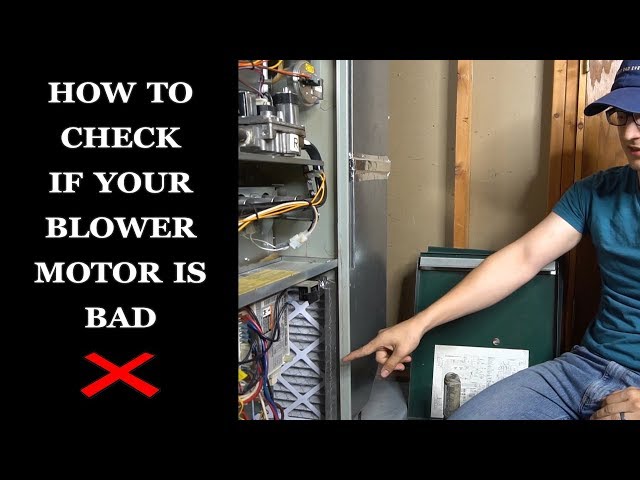
Youtube Video:
Quick Wiring Specifications & Terminal Guide
| Component / Circuit | Standard Wire Gauge | Recommended Protection |
|---|---|---|
| Control & Trigger Signals | 18 – 20 AWG | 5A – 7.5A Inline Fuse |
| Standard Auxiliary Load | 14 – 16 AWG | 15A – 20A Circuit Breaker |
| Main Power Feed / Supply | 10 – 12 AWG | 30A – 40A Heavy-Duty Relay |
Images References
Looking for more diagnostic guides? Explore our complete Air Conditioner Troubleshooting 4 section for step-by-step troubleshooting solutions.
